
Custom digital solutions · Australia
Custom Digital Signage & Digital Signage Solutions
Connect your screens, software and business information in one practical solution. Advertise Me designs custom digital signage for healthcare, education, retail and workplaces across Australia, with tailored layouts, integrations and support.

Built around your organisation
What is custom digital signage?
Custom digital signage combines commercial screens, content management software and tailored integrations to display the information your audience needs. A solution might show doctors’ rosters, meeting room availability, retail promotions or interactive directions. Advertise Me designs digital signage solutions for Australian organisations, connecting display hardware with practical content workflows and purpose-built software.
The starting point is the task: help a visitor find a room, show which practitioner is available, or publish consistent messages across several sites. The screen, interface and data connection are then selected around that task.
Digital signage solutions designed around your workflow
A successful display needs more than attractive graphics. Someone must own the information, keep it current and know what happens when a schedule changes. Customisation connects these operational needs with your brand, physical space and audience.
Our article on interactive digital signage describes touchscreen displays, kiosks, digital menus and custom web applications. These approaches let visitors choose relevant information, browse a directory or respond to a survey. For a passing audience, a simple scheduled message may be more appropriate.
| Component | Purpose | Decisions to confirm |
|---|---|---|
| Commercial displays | Present messages in the right location. | Size, brightness, orientation and operating hours. |
| Players and connectivity | Run content and connect screens. | Compatible devices, network access and recovery. |
| Content management | Publish media, layouts and schedules. | Screen groups, publishers and content ownership. |
| Custom software | Display approved business information. | Data sources, refresh timing and interface design. |
| Installation and support | Make the system practical to operate. | Mounting, commissioning, training and support scope. |
AdvertiseMe.TV provides cloud content management for images, video, text and layouts. Authorised users can organise displays into groups and schedule messages by date, time or location. Explore our digital signage software for the publishing layer behind these solutions.
Match the display format to the task
A portrait directory suits a list of rooms or practitioners. A landscape display can combine a welcome message with supporting information. A video wall creates a larger canvas for foyers and presentation spaces, while an interactive kiosk lets people explore at their own pace. The choice affects content design as well as equipment. Confirm where people stand, how long they spend looking and whether they need to touch the screen before selecting the format.
Custom digital signage for Australian industries
Healthcare and medical centres
Medical centres need clear information about practitioners, services and consulting locations. A custom medical board can combine the day’s roster with health information and practice announcements. Staff update structured information instead of repeatedly rebuilding a poster.
Our medical centre roster solution describes schedules organised by weekday or monthly calendar, alongside doctors’ availability and service information. Public displays should show only approved information; patient records and private appointment details need separate access controls. The practice should confirm who maintains rosters and approves public messages.

Education, meeting rooms and event venues
Universities, training centres and offices often hold room information in existing calendars. Connecting those calendars to screens helps visitors identify their meeting, check the room and find the right floor. A foyer board can show several events while a room panel focuses on one space.
Advertise Me’s Smart Room and Event Boards bring event times, room details and directions into a display interface. The same project can include digital wayfinding when attendees need navigation. Confirm which booking fields are public, especially where meeting titles contain confidential information.

Retail, hospitality and public destinations
Retail signage can present promotions, product information and seasonal campaigns. Hospitality venues can schedule menus for different service periods. In a shopping centre or public destination, an interactive directory helps visitors search for shops, facilities and services.
Our retail wayfinding article discusses the Sydney Fish Market project, where visitors use a digital directory to locate vendors, restaurants and facilities. The useful lesson is to design around the visitor’s next decision. Keep search, categories and directions easy to understand, and give authorised staff a process for updating listings.
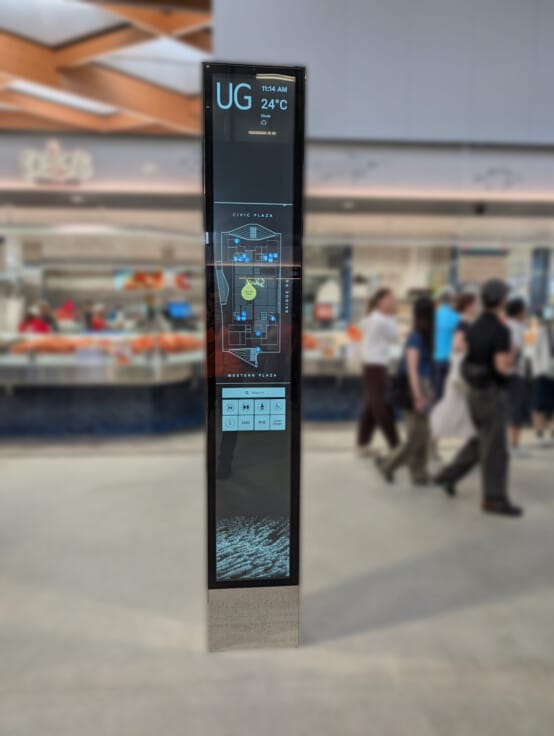
Corporate offices and councils can apply the same approach to welcome messages, staff information and public notices. Explore our industry solutions or project portfolio for examples relevant to your organisation.
Connect digital screens to the systems you already use
Custom integrations reduce duplicate data entry by connecting a display to an approved source of information. Room bookings, directories, event listings and operational dashboards are common starting points. Integration requirements depend on the source system’s available interfaces and your organisation’s permissions.
In our Microsoft 365 room calendar project, Microsoft Graph connects calendar information with digital displays, room availability and directory functions. Staff can continue managing bookings in Microsoft 365 while the signage presents the relevant information to visitors.
Our digital solutions integrations article also describes connections to event management systems and Social Wall. Data exchanges may use APIs, JSON, XML or other supported feeds. Each connection needs an agreed refresh interval, clear ownership and a fallback when the source cannot be reached.
Before development, identify the exact fields to display, permission requirements and expected behaviour when information changes. Test cancelled meetings, empty results, unavailable services and long room names. These details determine whether a custom display remains useful during everyday operation.
For example, a room directory might combine a room name, floor, current booking and next available time. The facilities team owns the location details, while the calendar supplies the booking. Agreeing those responsibilities early helps prevent conflicting information. It also makes future changes easier when a department moves or a room is renamed.
Keep your digital signage network manageable
As a network grows, consistent naming and support procedures become essential. Group screens by site, department or purpose so publishers can select the right audience. Give temporary notices an end date and regularly review information that may become outdated.
Our guide to managing a digital signage network covers displays, players, servers, connectivity and monitoring. It recommends wired network connections where practical and testing software updates before wider deployment. Monitoring can help identify an unresponsive device, but the support process must also explain who investigates and resolves the issue.

Agree how content behaves during an internet interruption. Locally stored media and live information have different dependencies; a cached image may remain available while a calendar feed cannot refresh. Confirm player capabilities and fallback messages during testing. Training should cover routine publishing, correcting mistakes and reporting faults.
Content also needs regular attention. Use readable text, strong contrast and a clear hierarchy suited to the viewing distance. Avoid relying on sound or colour alone. For touchscreens, provide understandable labels, generous touch targets and an obvious route back to the starting screen.
Planning your project, rollout and budget
Start with a short discovery brief. Identify the audience, location and communication problem, then define what a useful result looks like. This could be fewer manual roster updates, more consistent campaigns or easier room identification. Establish a baseline so the result can be reviewed after launch.
- Define the requirement. List screen locations, users, content types and existing systems.
- Review the site. Check light, viewing distance, power, network access and mounting constraints.
- Design and test. Agree layouts, data connections, publishing responsibilities and fallback behaviour.
- Pilot the solution. Test representative content and user tasks before expanding the rollout.
- Train and support. Document publishing, maintenance and the agreed support arrangements.
Custom digital signage pricing depends on the agreed scope. Screen quantity, display specification, media players, installation access, software subscriptions, integration work and support all affect cost. Existing equipment may be reusable after compatibility checks. A staged rollout can help confirm requirements before committing to additional locations.
For a useful quotation, provide your location, approximate screen count, photographs of proposed positions, available content and the systems you want to connect. Include your target launch date and any procurement or site access requirements. Our digital signage consulting services can help develop the brief.
Measure the result after launch
Choose measures connected to the original problem. For a roster board, review how long staff spend updating information and whether the displayed schedule is accurate. For a directory, observe whether visitors can find a destination without assistance. For a campaign network, check whether the right promotion appears at the right sites and expires on time.
Collect feedback from both viewers and the people publishing content. A layout that looks good in a design review may need larger text in a busy foyer. A useful handover records screen locations, approved templates and support contacts so the solution remains manageable when staff change.
Custom digital signage: frequently asked questions
How does custom digital signage differ from a standard screen playlist?
A standard playlist rotates prepared media. A custom solution can add branded layouts, interactive functions and connections to business systems, such as a doctors’ roster or room calendar, to support a specific workflow.
Can you use our existing screens?
Possibly. Advertise Me can review existing displays, inputs, players, operating hours and network access. Reuse depends on the equipment’s condition and compatibility with the proposed software and installation.
Can digital signage connect to Microsoft 365?
Yes. Advertise Me has connected Microsoft 365 room calendars to digital screens using Microsoft Graph. The required permissions, calendar fields and refresh behaviour are confirmed for each project.
Can different sites show different content?
Yes. AdvertiseMe.TV supports display grouping and scheduling so teams can target messages by location or purpose while managing content through a central browser dashboard.
Will the screens work without internet access?
This depends on the player and content configuration. Cached media may continue playing, while live data needs connectivity to refresh. Offline behaviour and fallback content should be tested before deployment.
How much does a custom digital signage solution cost?
Pricing is quoted against the project scope. The main factors are hardware, screen quantity, installation, software, integrations and ongoing support. Share your locations and requirements to obtain a relevant estimate.
Does Advertise Me provide solutions across Australia?
Yes. Advertise Me is based in Sydney, NSW and provides digital signage hardware and software solutions for organisations across Australia. Installation, delivery and support arrangements are confirmed for your location.
Discuss your custom digital signage project
Tell Advertise Me what your screens need to achieve. We can help scope the hardware, content management, integrations and support for your organisation.
Contact Advertise Me or email info@advertiseme.com.au.