
Modernise Scientific & Research Presentations with Digital ePosters
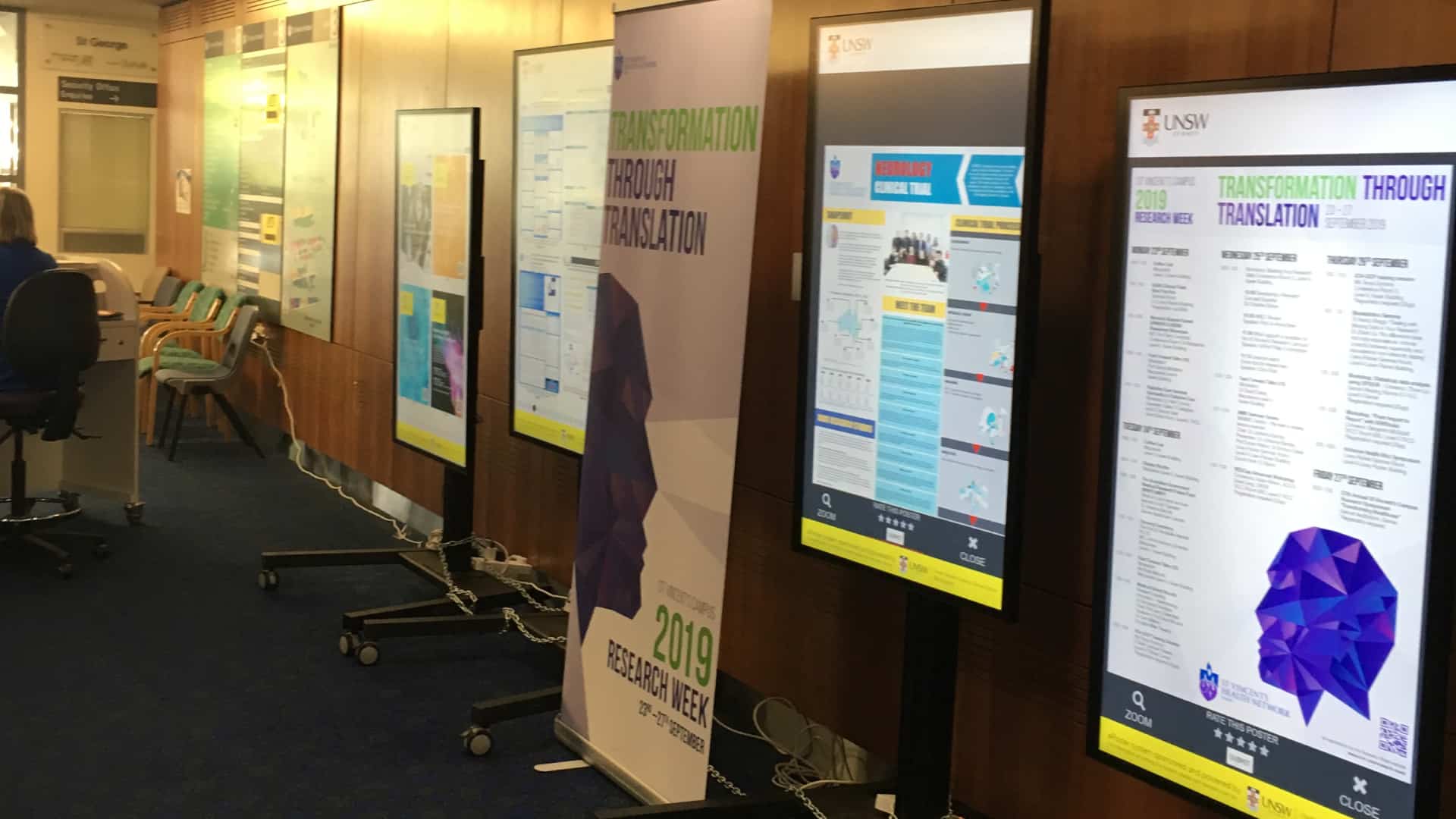
Revolutionise how research, medical papers, and scientific posters are presented at events. Our cloud-based **ePosters** solution eliminates printing costs, allowing presenters to display interactive, high-resolution media screens on 55″ commercial touch displays.
Designed from the ground up, our custom ePosters software combines advanced touchscreen interaction with powerful back-end search tools. You can hire or purchase the complete system, with bespoke hardware and custom software tailored to your venue or event.

Where You Can Use It

Exhibitions & Conferences
Display research and scientific posters interactively. Let attendees search, zoom, and browse details on demand.
Hospitals
Showcase medical research, clinic findings, and showcase event schedules directly in waiting rooms or lobbies.

Universities
Promote student work and academic posters dynamically during exhibitions, saving on print costs and space.
Key Features
Hardware Solution
Heavy-duty 55″ commercial touch displays, height-adjustable portable kiosks, and ultra-reliable media players designed for events.
Interactive Zooming
Interact with posters naturally. Attendees can scroll, zoom, and pan across high-res posters using simple touch gestures.
Sponsor & Logo Banners
Monetise your screens by displaying digital sponsor banners, logos, and slideshows alongside presentation lists.
Advanced Search
Let visitors search and filter posters instantly by author name, presentation title, department, or keyword.
Visitor Rating System
Collect feedback. Visitors can rate posters on-screen to generate instant reports for award categories or feedback.
Central Management
Control your entire kiosk network from a secure online dashboard, making updates and roster changes simple.
Professional Services We Provide
Full support scoping your venue, coordination, timelines, and technical integration.
Complete delivery, hardware rigging, wiring, software provisioning, and onsite testing.
Bespoke user interface development and custom poster designs tailored for your brand.
Real-time screen health monitoring, diagnostics, and quick backup support.
Custom code features and integrations adapted to event software or registry APIs.

View More Projects on the ePosters Website
Explore deep case studies, presenter guidelines, and our dedicated event portfolio on eposters.com.au.
Related Products
Explore our range of software products and add-ons designed for scientific and digital poster presentations.
-

BED MANAGEMENT MODULE FOR DIGITAL SIGNAGE
Read more -
CAR PARK MODULE FOR DIGITAL SIGNAGE SOFTWARE
Read more -
DIGITAL SIGNAGE SOFTWARE
Read more -
DIGITAL WAYFINDING SOFTWARE
Read more -
DONATIONS AND FUNDRAISING MANAGEMENT SYSTEM
Read more -
EPOSTERS SOFTWARE
Read more -
NEWS AND EVENTS MODULE FOR DIGITAL SIGNAGE
Read more -
NSW BUS AND TRAIN TIMETABLE BOARDS
Buy product -
SLIDESHOW PHOTOS ALBUM FOR GOOGLE PHOTOS
Request Custom AV / Digital Signage Quote -
SMART ROOM AND EVENT BOARDS
Read more -
SOCIAL WALL SOFTWARE
Read more -
STAFF ROSTER MODULE FOR DIGITAL SIGNAGE
Read more -
SURVEY MODULE FOR DIGITAL SIGNAGE
Read more




Our Recent Projects

ePosters – Health Beyond Research & Innovation Showcase 2026
Displaying dynamic and interactive scientific posters across 8 ePosters kiosks Interactive Digital Signage Solutions for the Health Beyond Showcase ePosters Interactive Digital…
View Project
ePosters – International Dementia Conference 2026
Displaying dynamic and interactive scientific posters at the IDC 2026 Interactive Digital Signage Solutions ePosters Interactive Digital Posters, Digital Posters Healthcare Years:…
View Project
ePosters – UNSW Health Beyond Research & Innovation Showcase 2025
Displaying dynamic and interactive scientific posters Interactive Digital Signage Solutions ePosters Interactive Digital Posters, Digital Posters Education, University Years: 2025 Campbelltown Catholic…
View Project
ePosters – CESPHN DDS25 (Data and Digital Showcase 2025)
Displaying dynamic and interactive scientific posters Interactive Digital Signage Solutions ePosters Interactive Digital Posters Healthcare Year: 2025 Intercontinental Hotel Sydney - New…
View Project
ePosters – UNSW Health Beyond Research & Innovation Showcase 2024
Displaying dynamic and interactive scientific posters Interactive Digital Signage Solutions ePosters Interactive Digital Posters Education, University Years: 2024 The William Inglis Hotel,…
View Project
ePosters – Wounds Australia 2024 Conference
Displaying dynamic and interactive scientific posters at conference events Interactive Digital Signage Solution ePosters Interactive Digital Posters Healthcare, Events Date: October 2024…
View ProjectHow an interactive ePosters project works
An ePoster is a digital scientific, medical, academic or research poster shown on a commercial touchscreen. The interactive ePosters experience lets an attendee search a collection, open a presentation, zoom into detail and move around the poster using touch gestures. Advertise Me provides the ePosters software and can supply a complete hardware and event solution around the requirements of the venue.
Planning should begin with the poster catalogue. Confirm the final poster file format, dimensions, naming convention and information fields before content is loaded. Titles, authors, institutions, departments, categories and keywords can help visitors find a presentation when they do not know which screen contains it. Consistent metadata also makes the event team’s content review easier.
Make the kiosk easy to use
The home screen should explain how to search and browse. Search results should be easy to read, the poster should open at a useful scale and visitors should have a clear back control. After a period of inactivity, the kiosk can return to the starting screen so the next visitor does not inherit the previous person’s session. Touch targets, contrast and the amount of text on screen should be tested on the actual display.
Present event and sponsor information
An ePosters display can include event branding, sponsor logos, introductory instructions, opening slides and other approved information. Sponsor content should support the event experience while leaving the poster catalogue clear and usable. A group of kiosks can be placed in a dedicated poster area, foyer, registration space or another suitable part of the venue.
ePosters for conferences, research and education
Conferences and exhibitions often have many submissions but limited wall space. Interactive digital posters allow attendees to search and explore presentations without printing and mounting every poster separately. Advertise Me has delivered ePosters projects for healthcare, medical, research and academic events, including the International Dementia Conference, UNSW Health Beyond Research & Innovation Showcases, CESPHN Data and Digital Showcase, Wounds Australia and the International Society of Physical and Rehabilitation Medicine.
Hospitals and research centres can use digital ePosters to showcase clinical research, innovation and quality improvement work. Universities can present student and academic posters during research weeks or showcases. A venue can also combine ePosters with digital signage for announcements, a video wall for programme information or digital wayfinding for room navigation. The right combination depends on the event and audience.
ePosters hardware and software features
- Commercial touch displays: the ePosters solution can use 55-inch touch displays and related media players.
- Interactive zooming: attendees can inspect charts, tables, diagrams and other poster detail.
- Search and filtering: the catalogue can be organised around supplied fields such as author, title, department or category.
- Portable kiosks: height-adjustable stands and event hardware can be considered for temporary deployments.
- Ratings and feedback: a visitor rating or feedback experience can be included when required by the event.
- Central management: content and kiosk updates can be managed through the configured software workflow.
ePosters event services
A successful digital poster event involves more than uploading PDF files. Advertise Me can discuss project management, user interface design, content loading, hardware supply, delivery, onsite installation, software provisioning, testing and event support. Remote monitoring and customisation can also be considered where the project needs ongoing oversight or an agreed connection with event software or another registry system.
Before the event, confirm the submission deadline, poster quantity, screen number, kiosk locations, power, network access, sponsor material and event staff responsible for support. After the event, agree whether the poster collection will be archived, reused or removed. These decisions help the ePosters system remain useful beyond the first presentation.
ePosters FAQs
What is an ePoster?
An ePoster is a digital research, scientific, medical or academic poster displayed on a screen. An interactive ePoster system lets visitors search, open, zoom and browse the content.
Can ePosters replace printed posters?
They can replace or complement printed poster displays depending on the event, venue and presentation requirements. Digital posters add search and touch interaction while reducing the need to print every poster.
What screens are used for ePosters?
Advertise Me can provide commercial touchscreen displays, including 55-inch screens, portable stands and media players. The final hardware depends on the event and venue.
Can attendees search for a poster?
Yes. Search and filtering can be configured around supplied fields such as author, title, department, category or keyword.
Where can I find more ePosters examples?
Visit eposters.com.au for more project information, or contact Advertise Me about an Australian conference, showcase or research event.
Preparing content for an ePosters event
The quality of the ePosters experience depends on the information supplied before the event. Confirm the final submission deadline, poster file format, dimensions, naming convention and metadata fields. If the catalogue includes author, title, institution, department, topic or category, use consistent spelling so visitors can search and organisers can review the collection accurately.
It is useful to test a sample of long titles, large diagrams, tables and posters with different image quality before all content is loaded. Check how the poster opens, how far visitors need to zoom, how the search results are ordered and how quickly the interface returns to the home screen. These tests help identify content issues before attendees arrive and reduce last-minute changes.
Operating ePosters during the event
Event staff should know how to start a kiosk, explain the search process, help a visitor find a poster and report a hardware or content issue. A short instruction on the home screen can reduce the need for assistance. Kiosks should be placed where there is enough room for people to browse without blocking registration, entrances or other displays. The organiser should also decide how sponsor messages, event notices and poster content rotate throughout the day.
Where visitor ratings or feedback are included, the event team should confirm what the response is used for and who can access it. If the poster catalogue is retained after the event, agree whether it will be archived, reused for another showcase or removed. A clear handover protects the organiser’s content and keeps the system ready for future events.
Why digital ePosters are useful
Printed posters require paper, printing, transport, mounting space and manual replacement. Interactive digital posters provide a searchable catalogue and allow visitors to inspect detail on demand. They do not remove the need for thoughtful research communication, but they give the event team more flexibility in how presentations are organised and displayed. ePosters can also be used alongside digital signage, video walls and digital wayfinding to create a connected event experience.
What should an organiser provide?
Share the venue, event dates, poster quantity, screen preference, kiosk locations, network and power details, branding, sponsor requirements, submission fields and any search or rating requirements. Advertise Me can then discuss the appropriate ePosters software, touchscreen hardware and event support.
Planning the ePosters visitor experience
Share the event programme, branding, poster fields, screen quantity, kiosk locations and support arrangements early. This allows the ePosters interface, touch hardware and content catalogue to be tested together. A clear search process, readable poster display and simple return to the home screen help every visitor use the digital poster system confidently.
Ready to Start Your Digital Project?
Get in touch with our team for practical advice and a quote tailored to your space. We deliver Digital Signage, Digital Wayfinding, Video Walls, Social Walls, ePosters, Information Kiosks, Directory Boards, and custom interactive software.
Direct Line
1300 880 005
Email Sales
info@advertiseme.com.au
Request a Quote
Submit your project specs and our team will get back to you promptly.