

When visitors need to know whether someone is available, running late, or already assisting another person, a clear digital employee status board can make the experience much easier. Our digital employee status boards use a staff roster system to show who is in, who is out, and what customers can expect, helping medical practices, hotels, offices, corporate teams, and service businesses communicate more clearly.

Looking for a digital employee status board?
Contact us on 1300 880 005 or request a quote and we will help you with your next digital solution.
What is a digital employee status board?
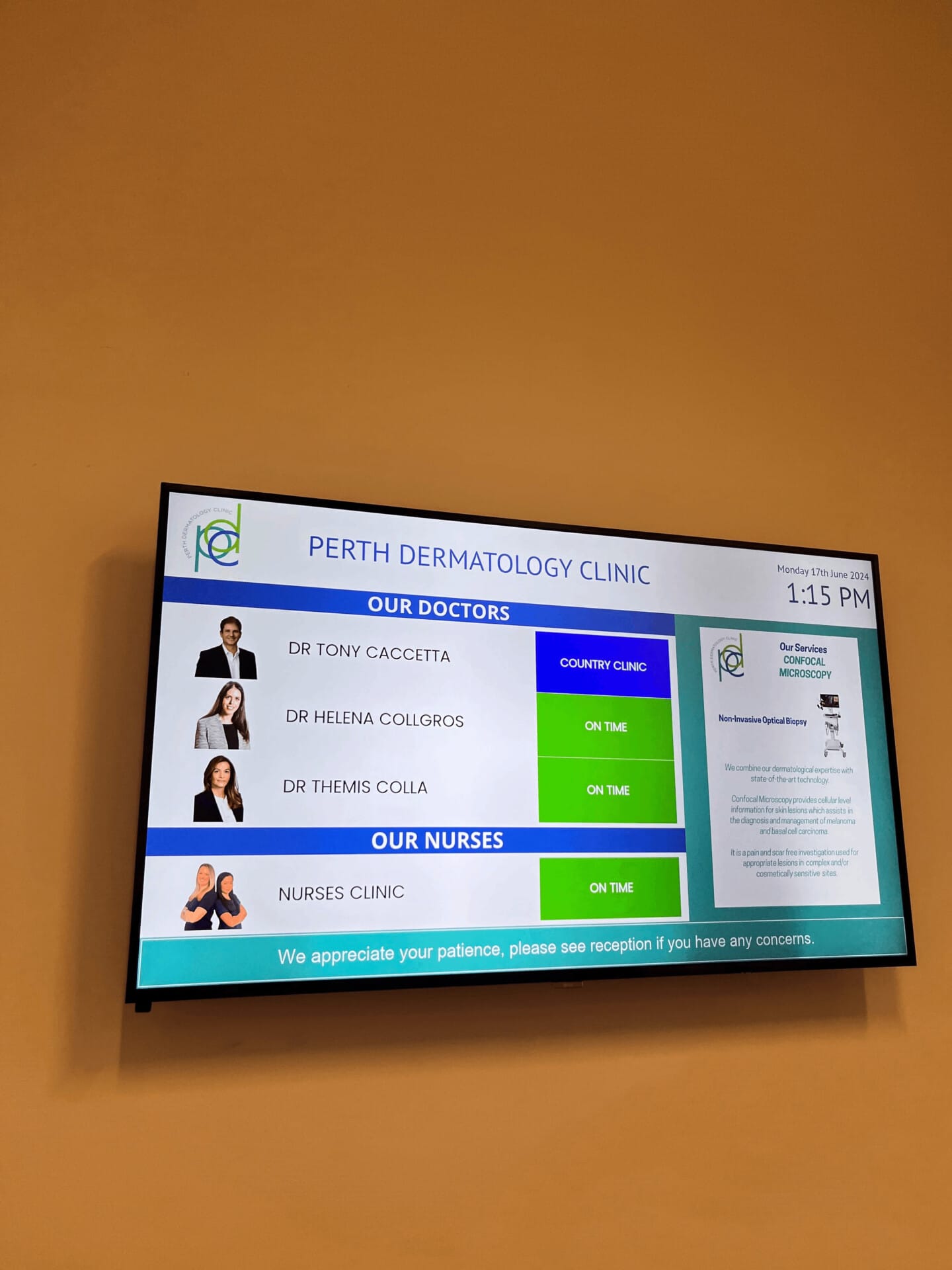
A digital employee status board is a screen that displays the current availability of staff members in a simple, easy to read format. Instead of relying on a paper notice, a crowded reception desk, or repeated questions, visitors can view useful information at a glance.
The board connects to a roster system. A manager or authorised team member can schedule staff, update their availability, and choose how that information appears on the digital signage screen. The display can show names, roles, departments, appointment information, availability, and expected wait times.
This is particularly useful in environments where staff availability changes throughout the day. A doctor may be running late, an allied health professional may be with another patient, or a hotel manager may be temporarily away from the front desk. The screen gives visitors a current and practical update without requiring staff to explain the same information repeatedly.
Why businesses are moving from paper rosters to digital displays
Traditional staff rosters can work for internal use, but they are not always suitable for visitors. A printed sheet can become out of date quickly. A spreadsheet may be accurate but difficult for the public to understand. Verbal updates also take time and can be missed during busy periods.
A digital board provides one visible source of information. It can be positioned in a reception area, waiting room, staff entrance, lobby, showroom, or shared office space. The information is presented in a consistent format, making it easier for people to understand what is happening next.
- Visitors can see whether the person they need is available.
- Reception teams spend less time answering routine availability questions.
- Managers can update roster information from a central system.
- Wait times can be shown alongside staff status.
- Different departments or service areas can be displayed on one screen.
- The display can be adapted for healthcare, hospitality, corporate, education, and operational settings.
A good status board does not try to show everything. It shows the information people need at the moment they need it.
How the roster system works
The strength of the solution comes from connecting the digital display to a structured staff roster. The roster provides the information, while the signage presents it in a way that is easy for customers, patients, guests, and employees to read.
Step one, create the staff roster
Managers can add staff members, roles, departments, and scheduled working times. A medical practice may list doctors, nurses, physiotherapists, and other allied health professionals. A hotel may list reception managers, concierge staff, event coordinators, and duty managers.
Step two, update availability
Staff status can be adjusted as the day changes. Common examples include available, in a meeting, with a customer, away, running late, or not scheduled. The wording can be adapted to suit the organisation and the expectations of its visitors.
Step three, publish the information to the screen
The approved roster information is displayed on a digital sign. A clear layout can group employees by department or service. It can also include a message area for general updates, directions, appointment instructions, or promotional content.
Step four, display wait times
Wait times can be shown beside the relevant service or team. This is valuable in medical centres, customer service areas, hotels, repair centres, and other businesses where people need to understand how long they may need to wait.
The result is a simple flow from roster management to public information. Staff update the source, and visitors see a useful display without needing access to internal systems.
 Decision matrix, is this right for your organisation?
 Decision matrix, is this right for your organisation?
The best way to assess a digital employee status board is to look at the daily communication problem you are trying to solve. The table below compares common requirements and shows where this type of display can provide the most value.
| Business requirement | Paper roster | Reception updates | Digital status board |
|---|---|---|---|
| Shows current staff availability | Low | Medium | High |
| Easy for visitors to view | Medium | Low | High |
| Can display wait times | Low | Medium | High |
| Supports multiple departments | Low | Medium | High |
| Reduces repeated questions | Low | Low | High |
| Can be updated during the day | Low | High | High |
A paper roster may be enough for a small internal team with predictable hours. Reception updates may work when visitor numbers are low. A digital status board becomes more useful when people regularly ask where someone is, how long they will wait, or which department can help them.
Where digital employee status boards can be used
Medical practices and allied health centres
The current use case is displaying doctor status so patients can see who is in, who is away, and who may be running late. The same system can show allied health professionals such as physiotherapists, psychologists, dietitians, podiatrists, and occupational therapists.
A waiting room display can also show an estimated wait time, appointment instructions, privacy notices, or general information. This gives patients a clearer understanding of the day without exposing private clinical details.
Hotels and hospitality venues
Hotels can use a status board to show which team is available to assist guests. The screen may identify the duty manager, concierge, event coordinator, or conference support team. It can also display the expected wait for reception assistance, room service enquiries, or group check in support.
For larger venues, the display can help direct guests to the correct service area. Information can be separated by function, making the lobby feel more organised during busy arrival periods.
Corporate offices
Corporate offices often have visitors who need to meet a specific employee or department. A status board can show whether a host is available, in a meeting, or expected shortly. It can also display the location of departments, meeting room information, and reception wait times.
This can be helpful for shared offices and larger workplaces where employees are not always sitting at a fixed desk. It provides a more professional arrival experience while allowing reception teams to focus on important visitor needs.
Professional services and customer service teams
Accounting firms, legal offices, recruitment agencies, financial services teams, and other professional businesses can use the display to communicate staff availability. A visitor may be waiting for a consultant, account manager, or customer support representative.
Showing a clear status is not a replacement for personal service. It is a practical tool that supports the team by setting expectations before a conversation begins.
Education, repair, and operational environments
The roster module can also suit universities, gyms, car service centres, smash repair centres, warehouses, and other organisations with changing teams. Staff may work across different areas, shifts, or service counters. A central screen can show who is available and where assistance can be found.
 Choosing the right display information
 Choosing the right display information
The most effective screen is not necessarily the one with the most content. Before launching a board, decide what visitors genuinely need to know.
- Which staff members are working today?
- Which departments or services should be visible?
- Should the screen show names, roles, or both?
- Which status terms will be easy for visitors to understand?
- When should a wait time be displayed?
- Should private or sensitive information be excluded?
- What additional messages would be useful between roster updates?
For a medical practice, patient privacy should remain a priority. A display can show that a doctor is available or delayed without showing personal appointment details. For a corporate office, it may be more appropriate to show a host name and general status. For a hotel, the focus may be on service areas rather than individual employees.
A practical implementation checklist
Moving to digital signage does not need to be complicated. A simple implementation can follow these steps.
- Identify the main visitor question. Decide whether people most often ask about availability, location, or wait time.
- Choose the display location. Place the screen where visitors naturally look when they arrive or begin waiting.
- Define clear status labels. Use short terms that can be understood quickly from a distance.
- Set up the roster structure. Organise staff by department, service, location, or shift.
- Nominate an administrator. Give responsibility for maintaining accurate information to a suitable team member.
- Test the screen with real users. Ask staff and visitors whether the information is easy to find and understand.
- Review the display regularly. Remove unnecessary details and adjust the layout as the business changes.
Frequently Asked Questions
What is a digital employee status board?
A digital employee status board is a screen that displays staff availability in a clear, easy-to-read format. It can show names, roles, departments, current status, appointment information and expected wait times.
How does a digital employee status board work?
The display connects to a staff roster system. Managers or authorised team members can add staff details, update availability and publish the approved information to a digital signage screen.
What information can be displayed?
A status board can show whether an employee is available, away, in a meeting, assisting a customer, running late or not scheduled. It can also include departments, service areas, appointment details, general messages and estimated wait times.
Which organisations can use digital employee status boards?
They are suitable for medical practices, allied health centres, hotels, offices, corporate teams, education providers, customer service areas, repair centres and other businesses where staff availability and wait times need to be communicated clearly.
What are the benefits of replacing a paper roster with a digital display?
A digital display provides visitors with one visible and current source of information. It can reduce repeated availability questions, make wait times easier to understand, support multiple departments and allow authorised staff to update information throughout the day.
Can the board show more than one department?
Yes. Staff can be grouped by department, service, or location. This allows one display to show doctors, allied health professionals, reception staff, managers, or support teams in a clear structure.
Can it display wait times?
Yes. Wait times can be included as part of the display design. They may appear beside a service, department, or general visitor message, depending on how your organisation operates.
Is it only suitable for healthcare?
No. Healthcare is a strong use case because patients need clear information about doctors and allied health professionals. However, the same roster based approach can support hotels, offices, corporate workplaces, universities, gyms, repair centres, warehouses, and customer service teams.
Can staff status change during the day?
Yes. The roster can be updated when circumstances change. This is useful when someone arrives late, leaves a meeting, becomes available, or needs to assist another customer.
What makes a status board useful?
Accuracy, readability, and simple wording matter most. Visitors should be able to understand the display within a few seconds. The board should support the way your team already works rather than create another complicated process.
If your reception team spends too much time explaining staff availability or expected wait times, a digital employee status board may be a practical next step. By connecting a roster system to digital signage, you can give visitors clearer information, help staff manage expectations, and create a more organised experience across healthcare, hospitality, corporate, and service environments.
Looking for a digital employee status board?
Contact us on 1300 880 005 or request a quote and we will help you with your next digital solution.


